
Last Updated: July 2022
On this page:
How do I minimise my video feed?
You can minimise your video feed when you are on a call. Your client or patient does not need to be on the call at the time. To minimise the feed, follow these steps:
- Log into Coviu as you normally would.
- Enter the call as you normally would (this could be your User Room, a Scheduled Session or joining a client or patient in the Waiting Area).
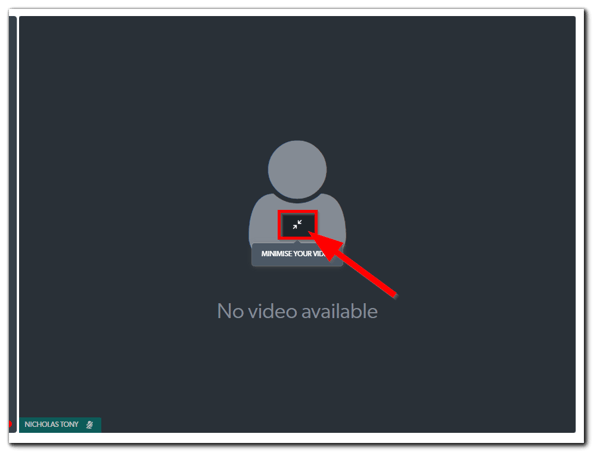
- Hover your mouse over your video window and click the Minimise Your Video button (this will shrink your video window to the lower-left corner of the call interface). If you are using a mobile or tablet device, you need to tap the video window of the client or patient to bring up the Minimise Your Video button.
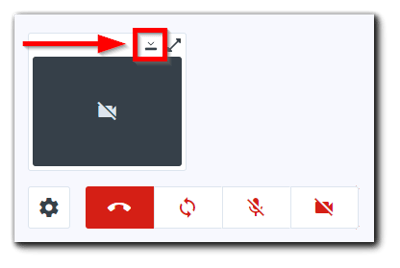
- To hide your video feed completely, click the Collapse Your Video button toward the bottom left corner of the call interface.
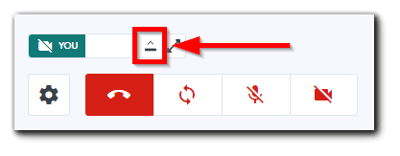
- To expand your video feed in the minimised window, click the Expand Your Video button at the same position.
How do I maximise my video feed?
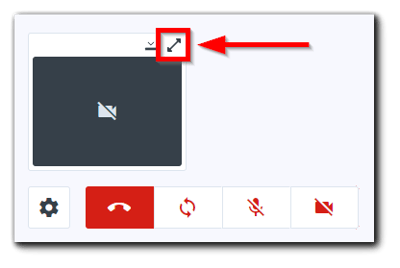
- Click the Maximise Your Video button toward the bottom left corner of the call interface. This will expand your video feed to the normal size.
FAQ
- Can I move the positions of the video feeds?
- No. Not at this stage.
- Can I adjust my video feed prior to entering the call?
- No. Turning your video feed on and off can only be done during the call.
- Can I set it to permanently off?
- No.
More support options
Check out this article for adjusting the video feed(s) when you are sharing a screen or other resource.
You have completed another Coviu help article. You now know how to minimise and maximise your video feed.
If this is not what you were looking for, explore our knowledge base and search for another article from here.
If you still require any assistance, please do not hesitate to get in touch with our friendly Customer Success team using any of the contact methods available here.