
Who this is for:
This article is intended for patients/clients joining a session.
If you are a healthcare practitioner, please refer to: How to Prepare for a Video Consultation on Coviu
Coviu is not a healthcare provider.
For any questions about your appointment, forms, scheduling, or provider instructions, please contact the service or clinic where you booked your appointment. You can usually find their contact details on their website or in the confirmation or reminder email/SMS you received for your appointment.
On This Page:
- How do I join my appointment?
- I can’t join my session
- My audio or video isn’t working
- I’m stuck in the waiting room
- Can I join using my phone?
- Still need help?
How do I join my appointment?
- Open the link sent to you by your provider (via email, or SMS).
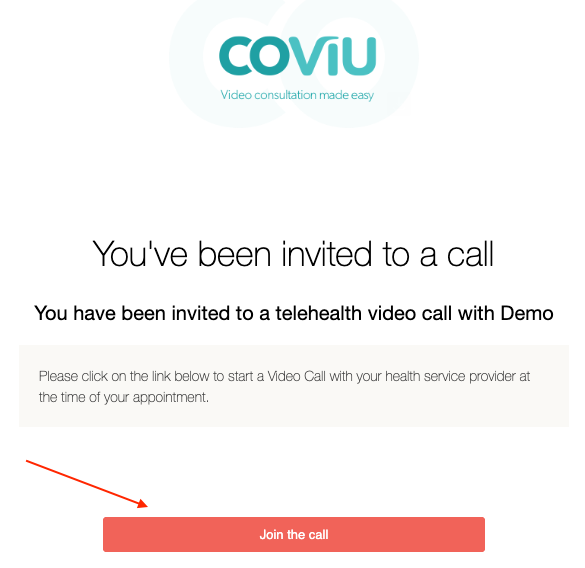
- Click Start a Video Call.
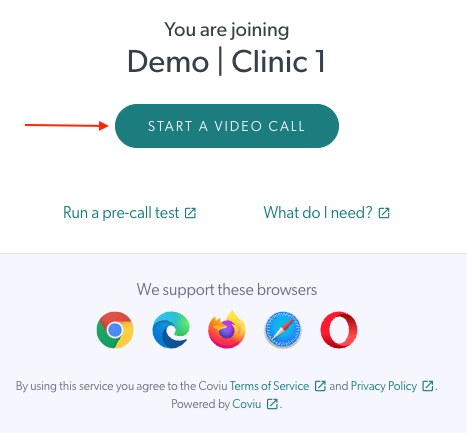
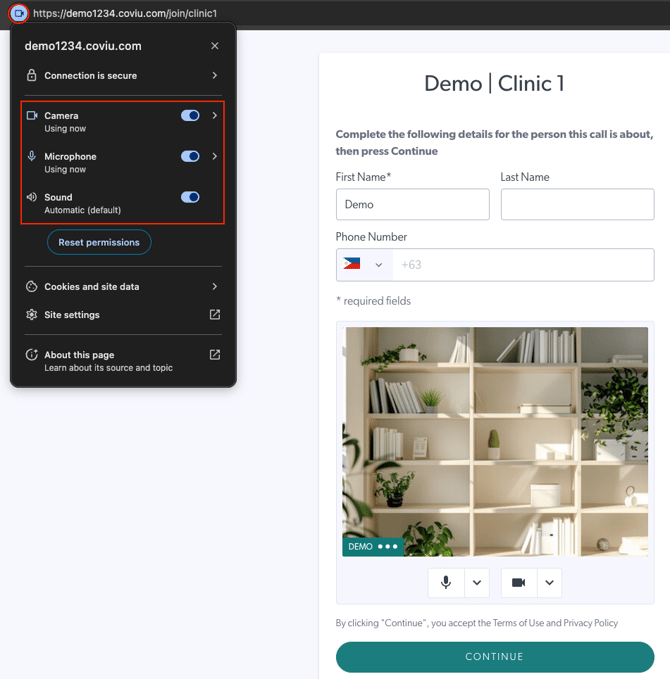
- Allow access to your camera and microphone.
- Enter your name when prompted.
- Click Continue to join the call.
Tip: Use Google Chrome for the best experience
Read full guide: How to Join Your Appointment
I can’t join my session
- Check your internet connection.
- Make sure you’re using a supported browser (Chrome, Safari, Edge).
- Try refreshing the page or reopening the link.
Read full guide: What to Do if You Are Having Trouble Joining a Video Call
My audio or video isn’t working
- Ensure your browser has permission to use your camera and microphone.
- Check that no other apps are using your camera/mic.
- Try leaving and rejoining the call.
Read full guide: How to Troubleshoot Audio and Video on macOS or How to Troubleshoot Audio and Video on Windows
I’m stuck in the waiting room
- Your provider may still be with another patient.
- Please wait a few minutes for them to admit you.
- If the wait is longer than expected, contact your provider directly.
Can I join using my phone?
Yes! You can join using your mobile browser—no app download required.
Still need help?
If you’re continuing to experience technical issues joining your session, you may:
- Try switching devices (e.g., phone ↔ computer)
- Restart your browser or device
For anything related to your appointment details, billing, or forms, please contact your healthcare provider directly.
We hope this helps you get connected quickly.